Connecting AI Agents to Your CRM: A Guide for Salesforce and HubSpot Users
Transform your CRM into a system of action. Learn how to connect Custom AI Agents for Business to Salesforce and HubSpot using MCP, APIs, and secure OAuth.
C2.2
The defining metric of a successful Custom AI Agents for Business strategy in 2026 is no longer the "intelligence" of the model, but its "integration." A brilliant AI agent without access to your CRM is like a world-class salesperson without a phone—it possesses the knowledge but lacks the means to act.
For organizations built on Salesforce or HubSpot, the goal has shifted from simple data entry to Agentic CRM Execution. This guide explores the technical architecture and strategic frameworks required to turn your CRM from a static database into a dynamic launchpad for autonomous business agents.
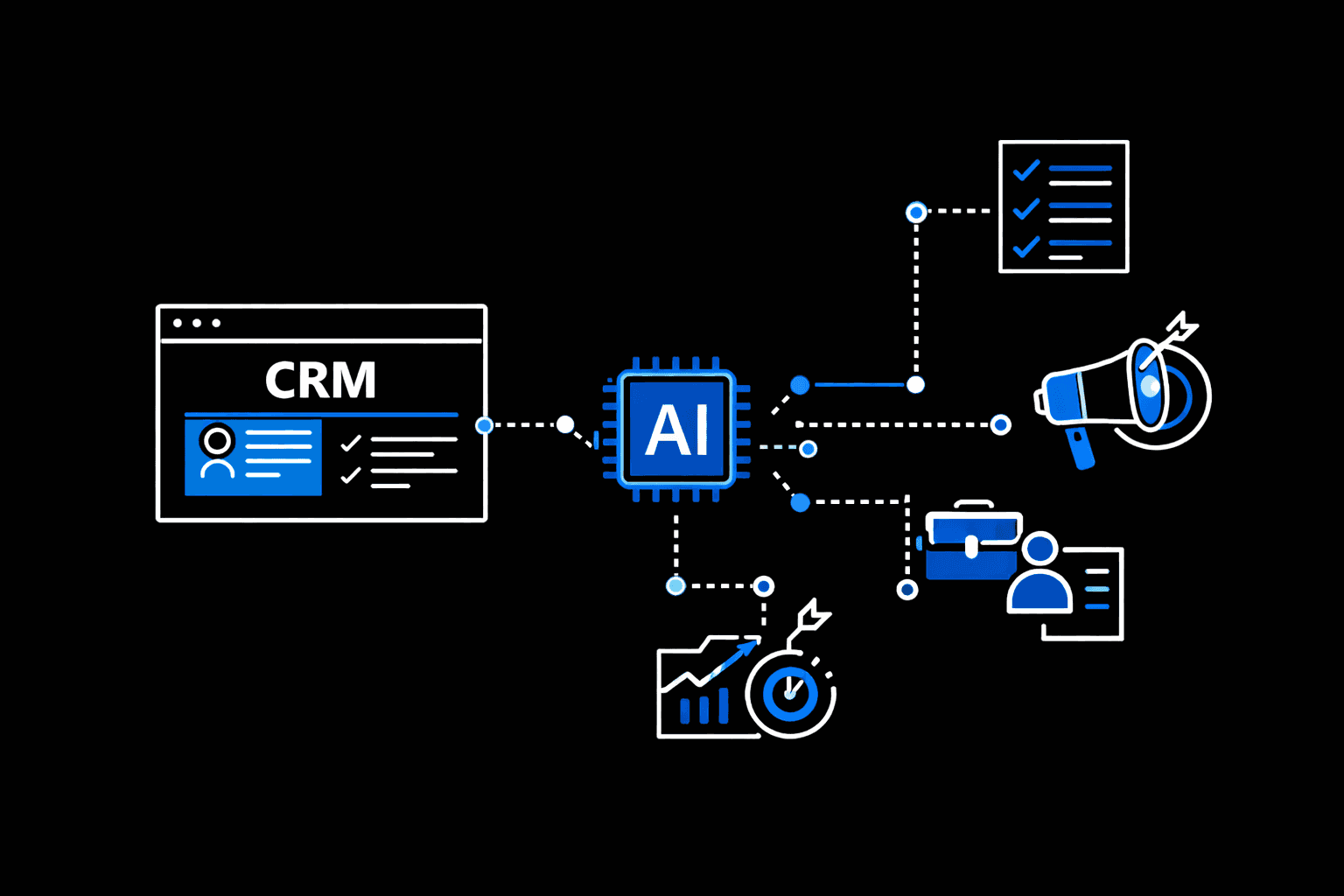
[Image showing a high-level architecture: AI Agent Reasoning Engine <-> API Gateway (OAuth) <-> CRM Objects (Leads, Accounts, Tasks)]
The CRM Evolution: From System of Record to System of Action
In the traditional SaaS era, CRMs were "Systems of Record"—places where humans manually logged interactions. In the agentic era of 2026, the CRM is a "System of Action."
When you deploy Custom AI Agents for Business, they don't just "read" customer data; they interpret it to trigger business logic. This requires moving beyond standard webhooks into a world of bidirectional, real-time synchronization where the AI can create tasks, update opportunity stages, and trigger complex workflows across your entire tech stack.
Architecture: How Agents "Talk" to Your CRM in 2026
The bridge between an LLM and a CRM is built on two critical technical foundations:
The Role of Tool Calling and Function Execution
Agents interact with Salesforce or HubSpot via Tool Calling (or Function Calling). Instead of the AI just generating text, it outputs a structured JSON object that instructs your CRM’s API to perform a specific action, such as update_lead_status or create_meeting_note.
MCP (Model Context Protocol): The New Standard
By early 2026, the Model Context Protocol (MCP) has emerged as the industry standard for AI-to-SaaS communication. MCP allows your agents to securely discover and correlate data across disparate systems (e.g., pulling a customer’s billing history from Stripe and syncing it to their Salesforce Account object) without requiring custom code for every single connection.
Integrating with Salesforce: Leveraging Agentforce and Data 360
Salesforce has reinvented its ecosystem around Agentforce. To integrate custom agents effectively, you must align with the Data 360 foundation.
Unified Data: For an agent to be effective, your Data Cloud must unify disparate streams (Email, Web, Sales) into a single "Golden Record."
The Einstein Trust Layer: When connecting custom agents to Salesforce, ensure the Einstein Trust Layer is active. This masks PII (Personally Identifiable Information) before it is sent to the LLM, ensuring your Custom AI Agents for Business remain compliant with global privacy laws.
Action Mapping: Use Salesforce "Actions" to define exactly what an agent can do—whether it's generating a quote or routing a case to a human expert.
Integrating with HubSpot: Mastering the App Marketplace and Custom Actions
HubSpot’s approach to agentic AI focuses on ease of use and "Context-Aware" workflows.
App Marketplace Integration: Use the native Salesforce-HubSpot connector to ensure that any action an agent takes in HubSpot (like scoring a lead) is instantly reflected in Salesforce.
Custom Code Actions: For complex logic, HubSpot allows you to write "Custom Code Actions" in Node.js or Python. This is where your Custom AI Agents for Business can execute multi-step logic, such as checking a customer's LinkedIn profile via a third-party API before updating their HubSpot contact record.
Security & Governance: Preventing "Agentic Data Leaks"
The most significant risk in 2026 is "Over-Permissioning." If an agent has "Admin" access to your CRM, a single prompt injection attack could lead to a massive data breach.
OAuth 2.0 and Scoped Permissions: The Principle of Least Privilege
Every agent must operate under a Service Account with limited scopes.
Scoped Access: A "Lead Qualification Agent" should have
writeaccess to the Leads object butnoaccess to Payroll or Financial reports.Audit Trails: Enable "Action Logging." In 2026, your CRM should provide a transparent record of every change made by an AI agent, allowing you to trace the "Chain of Thought" behind every automated decision.
The Implementation Roadmap: Sandbox to Production
Phase 1: The Sandbox: Always test agentic CRM integrations in a masked sandbox environment. Monitor for "API Throttling" and ensure the agent correctly handles pagination.
Phase 2: Shadow Mode: Allow the agent to "suggest" CRM updates that a human admin must approve.
Phase 3: Autonomous Execution: Once the agent achieves a >95% accuracy rate in the sandbox, grant it autonomous write-access to defined, low-risk objects.